go.vcu.edu Keywords
Overview
URL shortening is a technique in which a URL is made substantially shorter in length and still directs visitors to a required web page. Keywords are short, persistent words you use to replace long or difficult to remember URLs.
FAQ
- What are go.vcu.edu keywords?
- Why should I use go.vcu.edu keywords?
- How do I request a keyword?
- Can a keyword contain special characters?
- Can I make the keyword invisible on my website?
- Why was my keyword rejected?
- How do I manage my keywords?
- What is My Keyword List?
- Can I change a keyword that’s been approved?
- Can I delete a keyword?
- How can I change the URL that my keyword points to?
- Do temporary keywords expire?
- Can I make a temporary keyword permanent?
- Can usage statistics be viewed for temporary keywords?
- Can I reassign the ownership of a keyword?
- What happens if I specify a keyword that doesn’t exist?
What are go.vcu.edu keywords?
- Go.vcu.edu is a prefix used in conjunction with keywords to form short, persistent URLs.
- Go.vcu.edu keywords may only be used for VCU web pages.
- All permanent keywords are reviewed prior to approval.
Example: the official URL of the Biology Department is http://biology.vcu.edu/
If the Biology Department requests the go.vcu.edu keyword biology, when a visitor enters http://go.vcu.edu/biology in their web browser, they will be redirected to the Biology Department’s homepage.
If the keyword biology does not exist within the go.vcu.edu system, it's better to return a 404 or Not Found error message (instead of a 302, i.e. redirect). Now, there's a link on the error page pointing to the search results page for a missing keyword.
Why should I use go.vcu.edu keywords?
- go.vcu.edu keywords simplify long URLs (links) that are difficult to memorize and manually reproduce.
- A truncated URL provides a consistent URL if a link needs to appear in a publication (e.g. newsletters, posters, brochures).
- When a web user enters http://go.vcu.edu/eventkeyword, they will see updated content no matter where the actual web page is located.
For example, the URL (link) for Canvas training is:
With a keyword, the link is shortened to http://go.vcu.edu/canvas-training.
- Additionally, go.vcu.edu can be used by VCU students, faculty, and staff to find virtually anything with an obvious keyword. For example, the English Department’s website can be located by typing http://go.vcu.edu/english in one’s browser.
- No matter how often you redesign your website, using a permanent keyword will prevent your website's from receiving a 404 error (page not found).
- A go.vcu.edu URL informs potential visitors that your website is not spam.
- Twitter and some instant-messaging services limit the number of characters a message can carry. Using a shortened URL allows linking to web pages which otherwise violate this constraint.
Safety Tip: Some URLs can be harmful. Be careful clicking on links that were shortened using an external link shortening service, (e.g. bit.ly addresses).
When you encounter these addresses, use a shortened URL decoder such as http://longurl.org/ to discern the actual destination of the link.
How do I request a Keyword?
To request a keyword, you need a VCU eID and password. All permanent keywords are reviewed prior to approval.
Go to go.vcu.edu
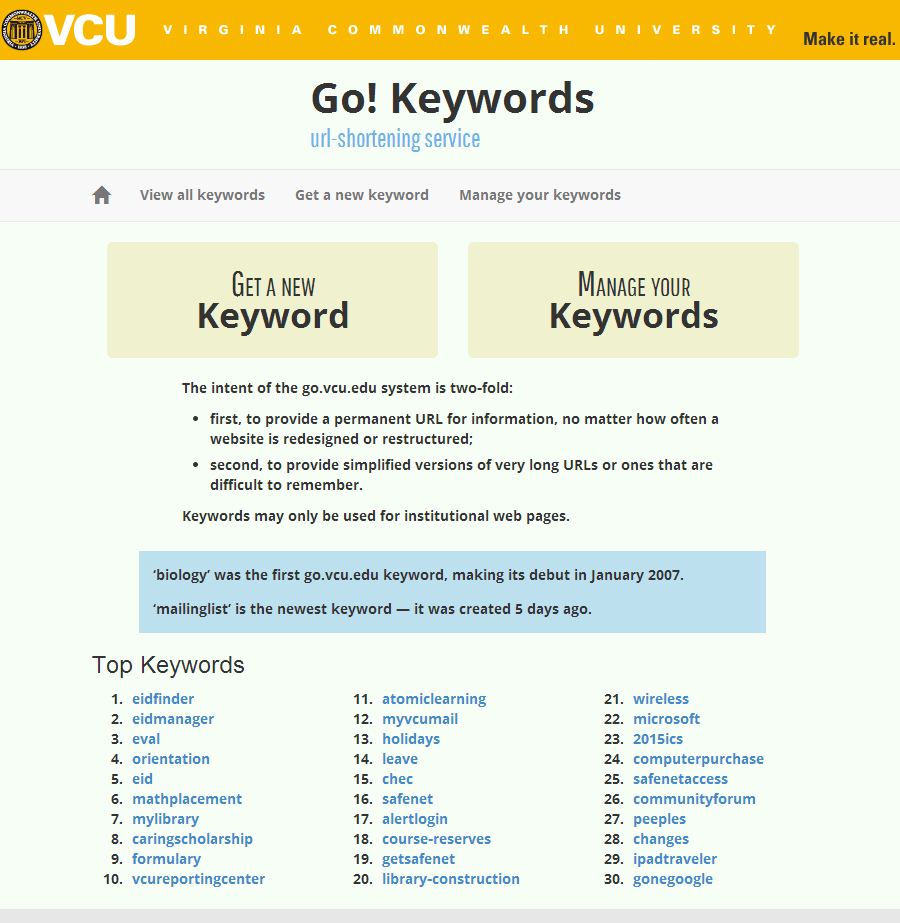
Click GET A NEW Keyword and log-in via CAS (Central Authentication Service).
Select either a permanent keyword or a temporary keyword. A temporary keyword automatically expires after 60 days unless you request an extension.
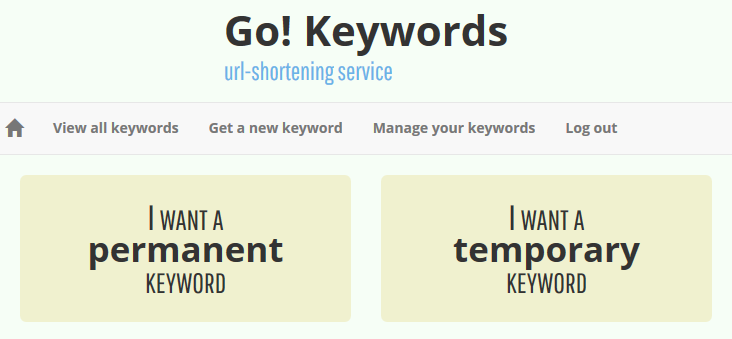
When you click I WANT A permanent KEYWORD, you will be prompted to answer three questions:
- What is your desired keyword?
- Which URL do you want to shorten? Copy and paste your website's URL (link) from your web browser into the field.
- How visible should your keyword be?
- Public - the keyword will be visible to all go.vcu.edu visitors
- Authenticated - go.vcu.edu visitors will be prompted to log in with their eID to view the keyword list
- Private - keywords will never be listed on go.vcu.edu
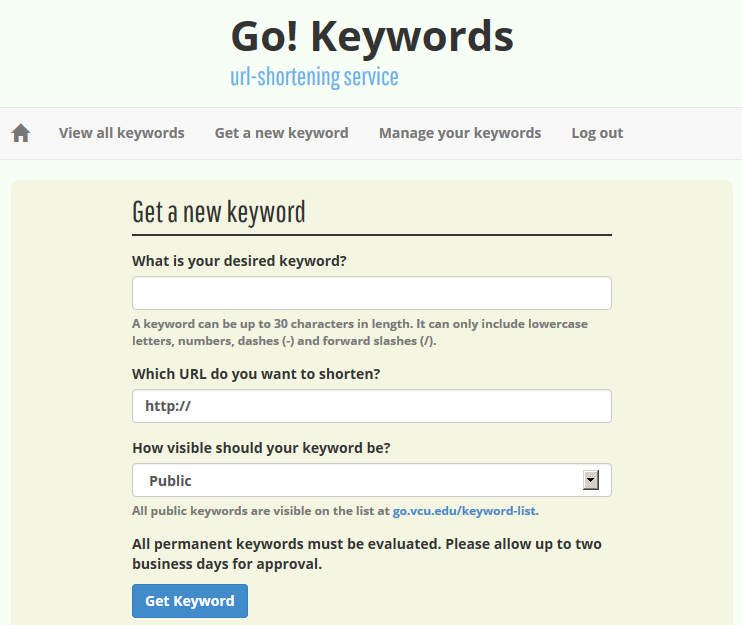
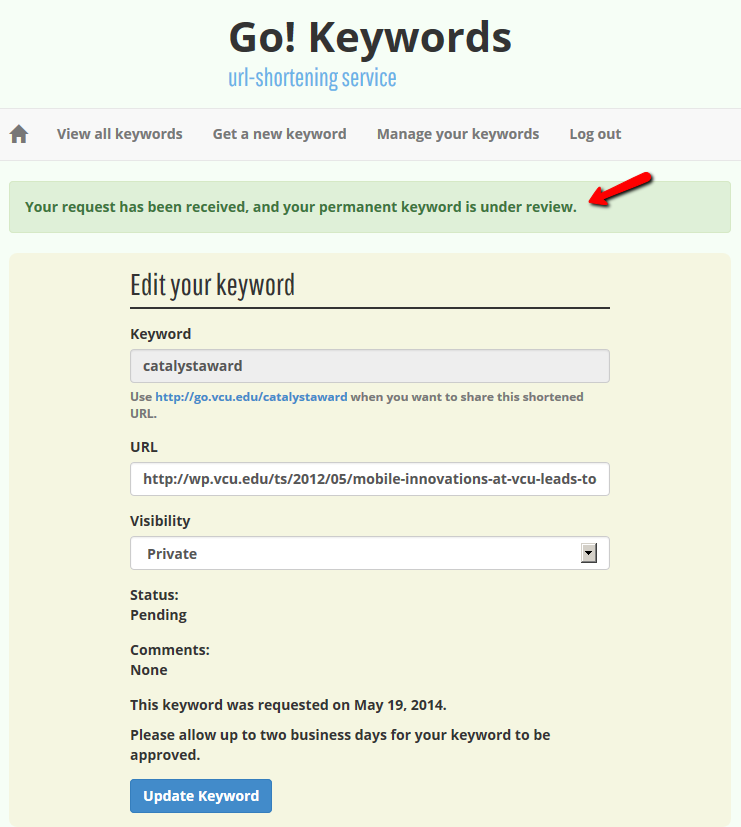
Click Get Keyword and the status of your request will display:
How do I manage my keywords?
To manage several keywords, click Manage your keywords in the main menu:
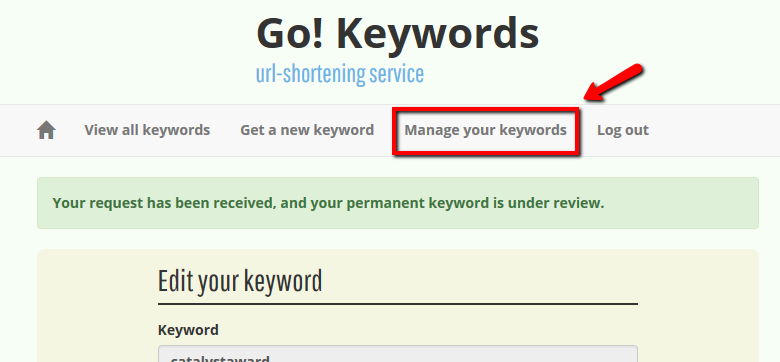
From Your Keywords, you can:
- Edit keywords and change their destination URL.
- View usage statistics (the number of times the keyword has been used).
- Remove (delete) old keywords from the go.vcu.edu system.
Can a keyword contain special characters?
- Your desired keyword cannot contain spaces or underscores.
- Allowable characters include lower case letters, numbers, horizontal dashes (e.g. chess-club), and forward slashes (e.g. survey/one).
- Your keyword can contain but not end with a forward slash.
Can I make the keyword invisible on go.vcu.edu?
- When you request a keyword, you can designate the “visibility” of the keyword on your website.
- Select “Public” to make keyword visible to all go.vcu.edu visitors.
- Select “Authenticated” to prompt go.vcu.edu visitors to log in with their eID and view the keyword list.
- Keywords designated as “Private” will never be listed on go.vcu.edu.
Why was my keyword rejected?
Keywords can be rejected for one of the following reasons:
- The keyword was requested for a non-VCU website or personal website.
- The keyword is more relevant to another URL. For example, the “Biology Club” cannot use the keyword biology since this would be more appropriate for the Biology Department.
- You requested a keyword that is part of another VCU URL. For example, www.xyz.vcu.edu has virtually reserved the right to the “xyz” keyword.
If you feel you have a legitimate claim to a reserved keyword, please email webmaster@vcu.edu.
What is Your Keywords?
- Click a linked keyword to view information about that URL, including status and hits.
- Click edit the URL and visibility value.
- The go.vcu.edu system keeps a record of all requested and rejected keywords unless you remove (delete) the keyword from the system.
- Your keywords no longer include separate views for "all," "approved," "pending," or "rejected."
Can I change a keyword that's been approved?
You cannot change the keyword once it has been approved, however, you can delete and request a new keyword.
Can I delete a keyword?
You can delete your keywords at any time. Within “Manage my Keywords,” click “Remove” to permanently delete your keyword. You will be prompted to verify your request.
How can I change the URL that my keyword points to?
- Go the My Keyword List screen and under the Action column, click Edit.
- If you edit your URL and it points to a non-vcu.edu web address, the status of the keyword will automatically reset to Pending and the keyword will be approved or rejected.
Temporary keywords
- All temporary keywords pointing to vcu.edu sites are automatically and immediately approved.
- All temporary keywords pointing to a non-vcu.edu site are reviewed prior to approval.
Do temporary keywords expire?
All temporary keywords expire after 75 days of inactivity.
Can I make a temporary keyword permanent?
Temporary keywords can be made permanent.
Can usage statistics be viewed for temporary keywords?
Yes, you can view the usage statistics for all of your keywords both temporary and permanent.
Can I reassign ownership of a keyword?
If you leave your department or change responsibilities, contact the TS Webmaster to reassign your keywords to another individual.
What happens if I specify a keyword that doesn’t exist?
If you specify a keyword that does not exist, it's better to return a 404 or Not Found error message (instead of a 302, i.e. redirect). Now, there's a link on the error page pointing to the search results page for a missing keyword.
The go.vcu.edu system keeps a record of all requested keywords (including rejected) unless the owner removes the keyword from the system.